Spending long hours in front of a computer screen frequently leads to creeping aches, stiff shoulders, and midday fatigue. Many remote professionals invest in premium desks and supportive seating, yet they still experience persistent discomfort at the end of the workday. While a solid desk and high-quality seating establish a healthy foundation, desk accessories determine how your head, neck, wrists, and eyes interact with your digital tools.
Positioning your screen too low forces your cervical spine into a forward slouch, while resting wrists on sharp desk edges strains delicate tendons. Integrating targeted ergonomic supplies bridges the gap between your furniture and your daily computing habits. Whether you work from an expansive office or a compact living room corner, choosing the right accessories restores neutral biomechanical alignment.
Elevating Sightlines with Sturdy Monitor Stands
When you place a computer monitor directly onto a desk surface, the top third of the display rarely reaches eye level. Looking downward for six to eight hours a day places enormous mechanical strain on your neck and upper back muscles.
A dedicated monitor stand raises your display to the correct anatomical height, ensuring your gaze rests naturally on the upper edge of the screen without tilting your head forward. Many modern stands feature height-adjustable columns or sliding platforms that let you calibrate the exact screen elevation.
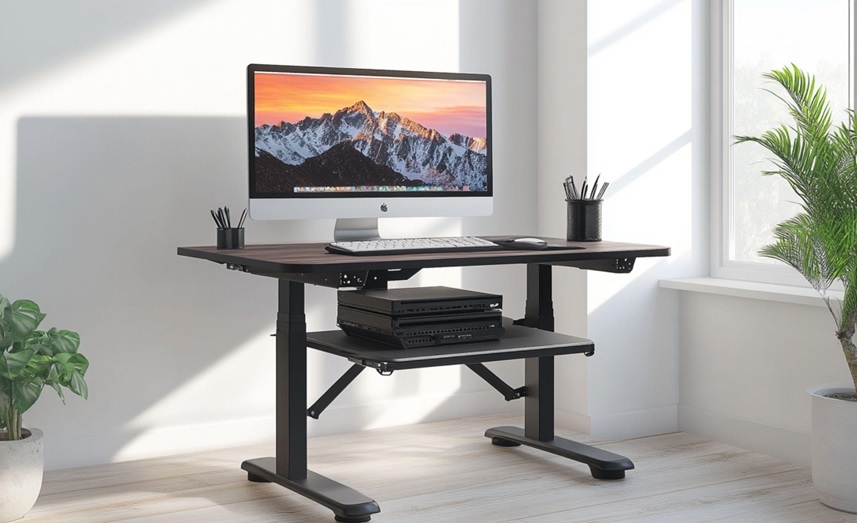
Furthermore, raising your screen frees up valuable desktop real estate underneath the stand. You can slide notebooks, external hard drives, or charging stations into the open clearance space, keeping your workstation tidy and distraction-free.
Unlocking Portable Flexibility with Laptop Risers
Laptops deliver outstanding mobility, but their compact clamshell design creates an ergonomic trap. Because the screen and keyboard attach permanently to one another, you cannot position the screen at eye level without forcing your hands into an awkward, elevated typing posture.
Using a dedicated laptop riser solves this dilemma instantly:
- Optimal Eye-Level Elevation – Elevates the laptop screen to eye level, preventing hunching and neck bending during long video calls and research tasks.
- Enhanced Thermal Ventilation – Lifts the laptop chassis off the desk surface, promoting continuous cooling airflow that prevents your laptop processor from overheating.
- Collapsible Portability – Folds down flat into a lightweight profile, allowing you to slip the riser into a backpack for mobile working across cafes, client offices, or home spaces.
- Pairing with External Peripherals – Encourages you to use a dedicated external keyboard and mouse, maintaining comfortable arm angles while protecting your wrists from repetitive strain.
Adding a versatile riser alongside proper ergonomic supplies ensures you maintain healthy spinal alignment wherever you set up your mobile workstation.
Protecting Wrists and Shoulders with Under-Desk Keyboard Trays
Standard desk heights typically sit around 72 to 75 centimetres above the floor. For most individuals, typing on this surface forces shoulders to shrug upward and wrists to bend backwards at unnatural angles.
An under-desk keyboard tray lowers your input devices to lap level, letting your elbows hang naturally at an open ninety-degree angle. High-performance trays include negative tilt adjustments, angling the keys slightly away from your body so your wrists remain straight and relaxed during intensive typing marathons.
Additionally, sliding keyboard trays retract fully beneath your tabletop when not in use. This clear-surface design expands your usable desktop area for physical paperwork, sketching, or reading.
Harmonising Desk Accessories with Supportive Seating
Desk accessories perform at their highest potential only when they complement your primary seating arrangement. Pair monitor risers and keyboard trays with supportive ergonomic chairs to create a complete ergonomic ecosystem that distributes your body weight evenly and supports your spine’s natural curvature.
When you sit in a chair that supports your lumbar region, you naturally hold your torso upright. An elevated monitor then keeps your neck straight, while a positioned keyboard tray prevents shoulder shrugging.
Investing in top-tier ergonomic chairs for your home alongside tailored desktop accessories ensures that your entire body stays energised, comfortable, and productive from your first morning meeting to your final evening email.
Transform Your Workday Comfort Today
Evaluating your physical friction points enables you to select the precise desk accessories that eliminate daily discomfort. Whether you need an elevated monitor platform, a mobile laptop lifter, or an articulating keyboard tray, targeted modifications deliver substantial posture improvements.
Audit your current desk setup today, observe your neck and wrist posture, and equip your workspace with high-performance accessories built to protect your long-term health.
Frequently Asked Questions
What is the ideal height for a computer monitor stand?
Adjust your monitor stand so your horizontal line of sight meets the top third of the screen when you sit upright with your shoulders relaxed.
Can I use a laptop riser without an external keyboard?
Typing directly on an elevated laptop riser strains your wrists and shoulders; you should always pair a laptop riser with an external keyboard and mouse.
How does a keyboard tray help relieve upper back tension?
A keyboard tray lowers your typing surface to elbow height, allowing your shoulder blades and trapezius muscles to relax instead of shrugging upward toward a tall desk.
For an extensive collection of science-backed accessories, desktop tools, and premium ergonomic supplies designed to enhance physical posture, comfort, and productivity, contact Ergoworks today.